
How I’m saving for my kids (and myself) with Beanstalk
If you are anything like me, then the thought of doing any kind of financial admin, like sorting out your kids’ child trust funds (CTFs) or even your own ISA is enough to bring on a cold sweat.
Well, thanks to Beanstalk* it need not be so daunting.
I had been putting off getting to grips with my kids’ accounts for years. The hassle of rummaging through paper statements and a clunky online portal meant I wasn’t that aware of how much we had saved for them or what fees were being charged. Plus, it was almost impossible to allow my partner or the grandparents to contribute.
But the onset of the pandemic focused my mind, like I’m sure it has for many families to consider ours and our kids’ money. I also wanted to involve the kids early in the saving process to teach them to look after their money, too.
Enter Beanstalk*!

As a bit of background I set up my older children’s CTFs with OneFamily (or Family Investments as they were known back then) and I had been saving between £10 – £20 a month.
In 2019, my first girl was born. I set up another Junior ISA and during this year I started using apps, like Moneybox, Plum, Chip and Tandem for myself – although I soon forgot that some of them charged a monthly fee – whoops!
In 2021, my second baby girl (4th baby) was born and again I set up a Junior ISA with OneFamily not realising there were other alternatives.
In 2022 I found Beanstalk after being invited to try the app by the co-founder of Beanstalk, Cem Eyi, a father who had gone through a similar experience with OneFamily and wanted to simplify saving and investing for his family in one easy-to-use app – hence Beanstalk was born.
His daughter’s Child Trust Fund was also with OneFamily and after struggling with their interface and the 1.5% annual fee, Cem wanted Beanstalk to be an easier experience for parents.
And it is.
So what is Beanstalk?
Beanstalk* is a simple app that makes saving for children (and yourself) easy. The app is packed with tools; including money back on purchases and rounding up your change.
I opened my children’s Beanstalk Stocks & Shares Junior ISA and ISA for myself in minutes – handy for a busy mum like me. There are no regular contributions I had to commit to, making it friendly to my sometimes-volatile finances.
Launched by the team behind KidStart, Beanstalk has been helping parents save for their children for over 12 years and has helped thousands of families save millions for their kids. You can join them today by clicking here*. Please remember, your capital is at risk as with any investment the value can go down as well as up.

Is Beanstalk free?
Downloading and using Beanstalk is free with no fixed monthly or minimums fees. There is an annual fee of 0.5% of account value, however, which beats the 1.5% fee charged by some other Child Trust Fund and Junior ISA providers at the moment.
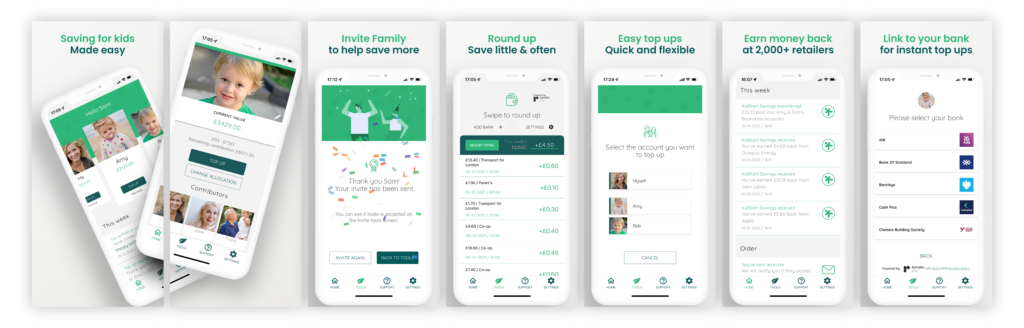
Some of the tools I used to help me save
Beanstalk has some handy tools to help me save little and often. I have found it easy to save on “auto-pilot” using their round up tool, for example. Also, I have invited hubby and extended family to be linked on the app. They can see their contributions and send messages with any gifts, which is nice for the children to see how their family has been saving for them over the years.
I also use their sister app, KidStart*, when shopping online to receive money back on my purchases – for example Sainsbury’s give up to 10% back which goes straight into my kids’ Beanstalk accounts. Conveniently, you can access it directly from the Beanstalk app or use the same credentials to log into the KidStart website or app.
What did I think of Beanstalk?
I found the Beanstalk app* very simple to use and I’ve pretty much used all the other apps in the online banking app space. Where Beanstalk stands out is that I’m saving for my ISA as well as the kids’ Junior ISAs and it’s all in one place, in front of your face.
With other platforms, I had to log onto the PC and check my account details, statements, and documents. It was overwhelming. What am I saving with? What are the fees? Where am I supposed to go to find out how much I’ve saved? With Beanstalk, it’s in one easy-to-use app, all in one place and you can share and invite people to contribute in just a few clicks of a button.
I found the information on the app valuable because I’m coming from a newbie standpoint and learning about the basics so that I can teach my kids to save and invest too. So having those kinds of tools available to me is vital.
We need to teach our kids to save what they can, when they can. They need to learn how to make their money work harder for them. This is the aim of Beanstalk, and my aim too.
Sign up to Beanstalk here and make savings simple for you and your family!*
This is a paid collaborative post with Beanstalk. As always with investments, your capital is at risk. The value of your investment can go down and up, and you may get back less than you invest. This information should not be regarded as financial advice. Links marked with a ‘*’ are affiliate links, which means I may mean earn a small commission at no extra cost to you when you click through and buy. Capital at Risk. See Beanstalk’s website for more details.