Nextbase 622GW dash cam: The secret weapon for school runs
Picture this.
It’s snowing/raining/sleeting and the roads are unsalted. Hoards of cars weave in and out of few unoccupied parking spaces and traffic is building up on both sides. One narrowly misses the other as both cars compete to push through the open bays. Horns are glaring in unison.
This is a regular morning school run for me, no matter the weather.
Every morning we leave the house at 7.30am to beat the inevitable traffic and we’re on the road until I take my fourth to playgroup around 9.30am.
One particular day felt crazier than normal. It had been snowing yet there were more cars on the road. As we turned a corner, a 4×4 hurled towards us and veered onto our lane. The driver quickly swerved back at a particularly angled part of the road but not before we almost hit the curb on our side. As we ventured further, we had to emergency brake at a car which stopped abruptly in front of us, almost causing the car behind to crash into us – all in the space of five minutes!
When we arrived at the second school run pit stop, a rather rude man with a Tesla blocked us in, then proceeded to eff and blind at me in front of the kids because I told him he was parked on a single yellow line and we couldn’t get out to get to our third stop. He moved his car eventually, but that didn’t stop us from being late.
When we arrived at the third stop, a car behind us reversed onto the road behind and almost got hit by a truck. The noise was enough to wake the other side of the equator. To say I had nervous shock when I got home was an understatement.
Of course it’s not always like this, but the school run can be tiring and chaotic at the best of times. If I had a pound for every time I shouted, ‘Learn to drive!’, or, ‘Indicate!’ at an oncoming car, I wouldn’t need to drive my kids to school anymore, I’d be retiring on an island and I’d have my own school rules! I’ve also uttered, ‘If only I had recorded the license plate,’ many a time.
Well now I can!
Are you tired of the school run turning into a chaotic, stressful mess every morning? Fear not, because I have the solution to all your road rage problems. Introducing the Nextbase 622GW dash cam which has become my new best friend on the road.
The Nextbase 622GW dash cam can provide added safety and peace of mind for parents while driving on the road, by recording footage, providing emergency assistance, and alerting drivers to potential hazards. It can even spot and record those pesky hit and runners while you’re parked and away from your car. #nowheretohide
Read on for the full Nextbase 622GW dash cam review and how it can help you on the school run too.
Get 5% off everything at Nextbase using the code LEYLA5 here!
What is the Nextbase 622GW dash cam?
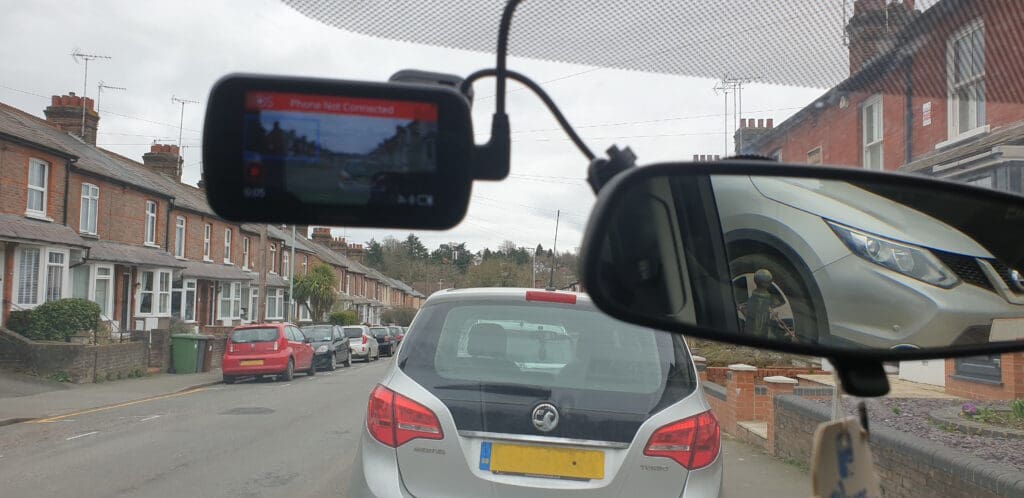
The Nextbase 622GW dash cam is a high-end dashboard front view camera designed for cars. It is a premium model in the Nextbase range and is equipped with advanced features and technology, including:
- 4K dash cam video recording: The camera can provide excellent image quality using ultra-high-definition video footage at a resolution of 3840 x 2160 pixels.
- Touch screen interface: The camera features a 3-inch touch screen display that allows for easy menu navigation and playback of recorded footage.
- Built-in Wi-Fi connectivity: The camera can connect to Wi-Fi networks, enabling users to transfer footage to a smartphone or tablet for sharing or editing.
- Emergency SOS feature: In the event of an accident, the camera can automatically alert emergency services and provide precise location sharing.
- Intelligent Parking Mode: The dashcam can monitor your vehicle while it is parked, using motion detection to trigger recording if someone approaches or collides with your car.
- Alexa built-in: The Nextbase 622GW dash cam has Alexa built-in so you can get directions, play music, make calls, and more, all hands-free.
- Image stabilisation: The camera has advanced image stabilisation technology to help reduce camera shake and ensure smooth footage.
- Multiple safety features: The Nextbase 622GW dash cam also comes equipped with several safety features, such as lane departure warnings, collision avoidance systems, and driver fatigue alerts.
What do you get in the Nextbase 622GW bundle? Unboxing the Nextbase GW K Dash Cam


The contents of the Nextbase 622GW bundle may vary depending on the retailer or seller. However, typically, the bundle should include:
- The Nextbase 622GW Dash Cam which is the main component of the package.
- A power cable to connect the dash cam to the car’s power source.
- A Click&Go PRO mount for easy installation and removal of the dash cam from the car’s windscreen.
- Some bundles may include a rear camera module that can be connected to the dash cam for recording footage of the rear view. Ours was included in this particular bundle.
- A MicroSD Card for storing the footage recorded by the dash cam. We received a 256gb U3 microSD card.
- A quick start guide that provides basic instructions for setting up and using the dash cam.
- Other accessories such as a carry case, screen protector, or cleaning cloth. We also received a sticker to place on the car’s rear or side window to warn other drivers that we are recording around us.


Get 5% off everything at Nextbase using the code LEYLA5 here!
Nextbase 622GW dash cam specs
The Nextbase 622GW is a highly advanced dash cam with features that include 4K Ultra HD recording, built-in GPS, Wi-Fi, Bluetooth, and emergency SOS response. It also includes Intelligent Parking Mode for added security and peace of mind. Below are the full specs of the Nextbase 622GW dash cam:
- 4K Ultra HD (3840 x 2160) resolution at 30fps, 1080p Full HD at 120fps, 720p HD at 240fps
- 140-degree wide-angle lens with six-layer glass and f/1.3 aperture
- 3-inch HD IPS touch screen display
- Built-in GPS module for location tracking and speed monitoring
- Built-in Wi-Fi for easy transfer of footage to a smartphone or tablet
- Built-in Bluetooth for hands-free calling and voice control
- Emergency SOS response system that can automatically call for emergency services in the event of an accident
- Motion detection and impact sensing to automatically record footage when the car is parked
- MP4 video format
- H.265 (HEVC) video codec
- Supports up to 128GB microSD cards (not included)
- 500mAh Lithium-ion battery
- 12-24V DC power supply via included car power cable
- 98mm x 45mm x 37mm height dimensions
- Weighs 128g


How to use Nextbase 622GW dash cam
There are a lot of components so make sure you familiarise yourself with the user manual and manufacturer’s instructions so you use the Nextbase 622GW dash cam properly. Below are the steps on how to install Nextbase 622GW dash cam, including the rear camera too.
- First, mount the dash cam on your car’s windshield using the Click&Go PRO mount included. Make sure the dash cam is securely attached by pressing the mount firmly against the glass and twisting the base to lock it in place. The ideal location should provide an unobstructed view of the road ahead and not interfere with your driving.
- Connect the dash cam to your car’s power source using the included power cable. Route the cable along the edge of the windshield, tucking it behind the car’s headliner and down the side of the dashboard. Connect the other end of the cable to your car’s power outlet, such as the cigarette lighter socket. Attach the dash cam to the mount by sliding it down onto the mount until it clicks into place. The dash cam should turn on automatically when your car starts up.
- Use the dash cam’s touch screen interface to adjust the camera settings to your preferences. You can choose options such as video resolution, frame rate, and exposure. Adjust the camera angle to ensure that it is aimed in the right direction and provides a clear view of the road ahead.
- The dash cam will start recording automatically when you start driving. You can also manually start and stop recording using the touch screen interface or voice commands.
- You can review the footage recorded by the dash cam on its touch screen or transfer it to your smartphone or computer using the built-in Wi-Fi connectivity or Micro SD card.
- The Nextbase 622GW dash cam comes with additional features such as Emergency SOS, Intelligent Parking Mode, and Alexa built-in. You can use these features to enhance your driving experience and ensure your safety on the road.
- Always make sure to comply with local laws and regulations regarding the use of dashboard cameras while driving.


How to remove Nextbase 622GW dash cam from mount
Here are the general steps to remove the Nextbase 622GW dash cam from its mount:
- Before removing the dash cam from its mount, turn it off by pressing and holding the power button until the screen turns off.
- Locate the locking mechanism on the Click&Go PRO mount and release it by pulling the locking lever or pressing the release button, depending on the specific model.
- Once the locking mechanism is released, gently lift the dash cam off the mount by pulling it upwards and away from the windshield. Be careful not to tug too hard or apply excessive force to avoid damaging the mount or dash cam.
- Once the dash cam is removed from the mount, disconnect the power cable from the dash cam’s power socket.
- Store the dash cam in a safe place, such as the carrying case provided or protective cover, to prevent damage or scratches.

Other Nextbase 622GW safety features – Extreme Weather Mode
The Nextbase 622GW Extreme Weather Mode is a feature that is designed to improve the image quality of the dash cam when driving in extreme weather conditions such as heavy rain, snow, or fog.
When Extreme Weather Mode is activated, the camera adjusts its exposure and contrast settings to compensate for the reduced visibility and lighting conditions. This helps to enhance the details and clarity of the video footage, making it easier to see and interpret what is happening on the road.
The Extreme Weather Mode also adjusts the camera’s image stabilisation and anti-glare settings to minimise the effects of weather-related issues such as windshield glare, snow or rain accumulation on the lens, or the vibration of the vehicle caused by strong winds or rough roads.
Nextbase 622GW does include a slow-motion feature.
This feature allows you to playback video footage in slow motion, which can be useful for reviewing details of an incident or for analysing driving behavior.
The slow-motion feature on the 622GW can be accessed through the camera’s playback menu, and can slow down footage by up to 10 times the original speed. This allows you to view the footage in detail and identify important information, such as the speed of the vehicles involved or the actions of pedestrians or other road users.
Nextbase 622GW problems
Like any electronic device, the Nextbase 622GW dash cam may experience problems or issues during use. Here are some common problems that users may encounter with the Nextbase 622GW dash cam:
- You may experience connectivity issues when trying to transfer footage from the dash cam to a smartphone or computer. This can be resolved by ensuring the Wi-Fi connection is stable and the correct settings are selected.
- You may experience errors with the Micro SD card, such as a “card error” message or difficulty reading the card. This can be resolved by checking the card is compatible and properly inserted into the dash cam.
- There may be issues with the dash cam’s power supply or battery life. This can be resolved by ensuring the power cable is securely connected and the battery is fully charged.
- The Click&Go PRO mount may not stick properly to the windshield or it isn’t securing the dash cam properly. This can be resolved by ensuring the windshield is clean and free from obstructions and that the mount is installed correctly.
- The dash cam can overheat in hot conditions or direct sunlight. This can be resolved by parking in shaded areas or investing in a sunshade for the windshield.
- There may be issue with the app’s settings in that it hibernates when not in use. We are still trying to resolve this issue with my Android phone.
If you experience any issues with your Nextbase 622GW dash cam, it is recommended to refer to the user manual or contact Nextbase customer product support for assistance.
Nextbase 622GW dash cam best price
The Nextbase 622GW price can vary depending on the retailer, availability, and any ongoing promotions or discounts. It is always recommended to shop around and compare prices from various retailers to find the best deal.
You can check the prices of the Nextbase 622GW dash cam on popular online retailers such as Amazon, as well as the official Nextbase website. You may also want to check for any special deals or promotions during holiday periods such as Black Friday or Cyber Monday.
Save almost £100 and buy the Nextbase GW K dash cam bundle here
How can the Nextbase 622gw keep parents safe?
The Nextbase 622GW dash cam can help parents stay safe on the road in several ways. Here are some ways that the dash cam can benefit parents:
The Nextbase 622GW dash cam records evidence in the event of an accident
The Nextbase 622GW dash cam can record high-quality footage of any incidents that occur while driving, such as accidents or near-misses. This footage can be used as evidence in the event of an insurance claim or legal dispute, helping parents prove their innocence and avoid potential penalties or legal consequences.
The Nextbase 622GW dash cam provides emergency assistance
The Nextbase 622GW dash cam’s Emergency SOS feature can automatically contact emergency services and provide the driver’s location in the event of a severe impact, such as a serious accident or medical emergency.
The Nextbase 622GW dash cam prevents accidents
The Nextbase 622GW dash cam is equipped with several safety features, such as lane departure warnings and collision avoidance systems that can alert drivers to potential hazards on the road and help them avoid accidents.
The Nextbase 622GW dash cam has built-in Alexa
The Nextbase 622GW has Alexa built-in so parents can get directions, play music, make calls, and more, all hands-free without taking their eyes off the road.
Added bonus – The Nextbase 622GW dash cam can monitor inexperienced drivers
If parents are supervising a newly licensed teenage driver, the dash cam can be used to monitor their driving behaviour and provide feedback on areas for improvement.
Are dash cams worth the expense and hassle of installing and what is the best way to setup a dash cam in a car?
Dash cams can be a worthwhile investment for several reasons. They can provide valuable evidence in the event of an accident or other incident on the road, help deter theft or vandalism, and even capture interesting or scenic moments during your travels.
Dash cams are typically easy to install and require minimal hassle. They can be mounted on the windshield or dashboard with a suction cup or adhesive pad and plugged into the car’s cigarette lighter or USB port. Some models may also require hardwiring for more advanced features such as parking mode or continuous recording.
Overall, the benefits of having a dash cam in your car can outweigh the expense and hassle of installation. Just make sure to follow the manufacturer’s instructions and local laws regarding the use of dash cams while driving.
What other dash cams should you consider?
Nextbase is a popular brand of dash cams that offers a range of models with various features and price points. Here are some Nextbase dash cams you may want to consider:
- Nextbase 522GW – This is a high-end dash cam with features such as 1440p HD video recording, built-in Wi-Fi, GPS, and Alexa integration.
- Nextbase 422GW – This is a mid-range dash cam with similar features to the 522GW but with a slightly lower resolution of 1080p HD video recording.
- Nextbase 222 – This is a budget-friendly option with 1080p HD video recording, a compact design, and easy installation.
- Nextbase 312GW – This is a popular mid-range dash cam with 1080p HD video recording, built-in Wi-Fi, and GPS.
Ultimately, the best dash cam for you will depend on your needs and budget.
Why choose the Nextbase 622GW dash cam over other dash cams?
The Nextbase 622GW is a highly rated dash cam that is considered by many to be one of the best on the market.
This bad boy is packed with features that will make your daily commute smoother than a baby’s bottom. With its crystal-clear 4K resolution and advanced night vision, you can capture every detail of your journey, no matter how dark or gloomy it may be outside.
But that’s not all – the Nextbase 622GW also comes equipped with intelligent parking mode, which means you can park up and leave your car knowing that it will record any potential incidents while you’re away. So if someone decides to reverse into your vehicle or attempt a break-in, you’ll have evidence at hand to show the authorities.
And let’s not forget about the safety aspect of this nifty device. With its Emergency SOS feature built in, you can rest assured that help is just a button press away should anything go wrong during your travels. Plus, its automatic emergency response notifications mean that should an incident occur while driving alone or with passengers, emergency services will be alerted immediately for rapid response.
The Nextbase 622GW dash cam can also prevent arguments between siblings fighting over who touched who first during the car ride!
So there you have it folks – the Nextbase 622GW dash cam is more than just a camera; it’s a lifesaver for busy families constantly on-the-go during school runs. Protect yourself from reckless drivers and keep calm throughout those hectic mornings with this indispensable gadget by your side.
For a full list of features and specs on the Nextbase 622GW dash cam, visit Nextbase’s website here.
Save almost £100 and buy the Nextbase GW K dash cam bundle here
FAQ
Why will the dashcam screen go black after recording for some time?
There could be a few reasons why a dash cam’s screen may go black after recording for some time:
- Many dash cams have a power-saving feature that automatically turns off the screen after a certain amount of time to save battery power. This is a normal function of the dash cam and is designed to prolong the life of the device’s battery.
- If the dash cam becomes too hot due to prolonged use or exposure to direct sunlight, it may shut off the screen to prevent damage to the device. In this case, it is recommended to move the dash cam to a cooler location or turn it off for a while to allow it to cool down.
- If the dash cam’s memory card becomes full, it may stop recording and turn off the screen. This is a safety feature to prevent the device from overwriting important footage. In this case, you will need to transfer the recorded files to a computer or other storage device to free up space on the memory card.
- If the dash cam’s screen goes black after recording for some time and none of the above reasons apply, there may be an issue with the device itself. In this case, contact the manufacturer for assistance or have the device checked by a professional.
How to fit Nextbase 622GW dash cam?
Follow the instructions above to correctly install the Nextbase 622GW dash cam.
Once the dash cam is installed, it should begin recording automatically when you start your vehicle. Make sure to regularly check the dash cam to ensure it is recording properly and that the memory card has enough space to store your recordings.
How long does a 256GB SD card last in a dash cam?
The lifespan of a 256GB SD card in a dash cam will depend on several factors, such as the quality of the card, the type of dash cam, and the frequency of use.
Generally speaking, SD cards have a limited number of write cycles before they start to fail. This means the more frequently the card is written to, the shorter its lifespan will be. Dash cams tend to write data to the SD card continuously, which can put a strain on the card and reduce its lifespan.
Assuming a high-quality SD card and a typical dash cam usage pattern, a 256GB SD card in a dash cam could last anywhere from several months to a few years. However, it’s worth noting that SD cards can fail unexpectedly, so it’s always a good idea to back up important footage regularly and replace the card periodically to minimise the risk of data loss.
How many hours can you record on a 64GB dash cam?
The amount of recording time you can get on a 64GB dash cam will depend on several factors, including the video resolution and bitrate settings of the dash cam. Here are some estimates based on common video settings:
- 1080p resolution at 30 frames per second and a bitrate of 15Mbps: Approximately 8 hours of recording time on a 64GB card.
- 1080p resolution at 60 frames per second and a bitrate of 20Mbps: Approximately 5.5 hours of recording time on a 64GB card.
- 1440p resolution at 30 frames per second and a bitrate of 25Mbps: Approximately 4.5 hours of recording time on a 64GB card.
- 4K resolution at 30 frames per second and a bitrate of 60Mbps: Approximately 1.5 hours of recording time on a 64GB card.
It’s important to note that these estimates are just rough guidelines, and actual recording time may vary depending on a number of factors such as the specific dash cam model, the temperature and humidity of the environment, and how frequently the dash cam is recording over existing footage (loop recording). Additionally, it’s always a good idea to periodically review and offload footage from your dash cam to a computer or other storage device to ensure that you have enough space for new recordings.
Is 32GB enough for a dash cam?
Whether 32GB is enough for a dash cam will depend on several factors, such as the resolution and bitrate settings of the camera, the frequency of use, and how often you transfer files off the card. Here are some general guidelines:
- For a dash cam recording at 1080p resolution at 30 frames per second and a bitrate of 15Mbps, a 32GB card could provide approximately 4 hours of recording time before it becomes full.
- If your dash cam records at a higher resolution or frame rate, or if you prefer to set a higher bitrate, then the amount of recording time you can get on a 32GB card will be reduced accordingly.
- If you don’t use your dash cam frequently, or if you transfer files off the card regularly, then a 32GB card may be sufficient for your needs.
However, it’s important to note that dash cams record continuously and overwrite old footage once the card becomes full (in a loop recording mode), so you may not have access to all of the footage you’ve recorded if you don’t transfer files off the card regularly. It’s generally recommended to use a card with at least 64GB of storage capacity if possible, to ensure that you have enough space for your recordings and to minimise the need for frequent file transfers.
What is used for Wi Fi on a dashcam and how does it work? Which dashcam models are equipped with Wi Fi?
Dash cams equipped with Wi-Fi use the Wi-Fi module to create a wireless network that can be used to transfer files, adjust settings, and view recordings on a smartphone or tablet.
When you connect your smartphone or tablet to the Wi-Fi network created by the dash cam, you can use a companion app to access the dash cam’s features and settings. Depending on the dash cam model and the features supported by the app, you may be able to:
- View live video from the dash cam
- Download and view recorded footage
- Adjust video settings
- Format the SD card
- Update the firmware
There are many dash cam models that are equipped with Wi-Fi, including popular brands such as BlackVue, Thinkware, and Viofo.
It’s worth noting that not all dash cams with Wi-Fi have the same features or capabilities, so it’s important to research different models and read reviews to find one that fits your needs.
How do I install a dash cam without a cigarette lighter?
If your vehicle doesn’t have a cigarette lighter or accessory socket, you can still install a dash cam by using a hardwire kit. Here’s how to do it:
- Purchase a hardwiring kit for your dash cam. This kit should include a cable that connects to the dash cam, a fuse tap, and a ground wire.
- Locate your vehicle’s fuse box. This is usually located in the driver’s side footwell or under the hood.
- Find a fuse that is only powered when the ignition is turned on. This is important to prevent the dash cam from draining your vehicle’s battery when the engine is turned off.
- Insert the fuse tap into the selected fuse location. The fuse tap should have two slots: one for the original fuse and one for a new fuse. Insert the original fuse into the top slot, and the new fuse (which should be included in your hardwiring kit) into the bottom slot.
- Connect the red wire from the hardwiring kit to the new fuse in the fuse tap.
- Connect the black wire from the hardwiring kit to a metal ground point in the vehicle. This could be a metal bolt or screw in the vehicle’s frame.
- Connect the cable from the dash cam to the hardwiring kit.
- Test the installation by turning on the ignition and ensuring that the dash cam powers on.
It’s important to note that hardwiring your dash cam may require some knowledge of your vehicle’s electrical system, so if you’re not comfortable with this type of installation, it’s best to consult a professional or seek help from a knowledgeable friend. Additionally, be sure to check your local laws and regulations regarding the use of dash cams and their installation before attempting this installation.
Can I use a dashcam as a webcam?
In general, most dash cams are not designed to be used as webcams, and their functionality is limited to recording and saving video files to an SD card. However, some dash cam models do have a webcam function that allows them to be used as a live streaming camera.
To use a dash cam as a webcam, you will typically need to connect it to a computer via USB cable and install any necessary drivers or software. The specific steps will depend on the make and model of your dash cam and the software you plan to use for streaming.
It’s worth noting that using a dash cam as a webcam may not result in optimal video quality, as most dash cams are optimised for recording video in a moving vehicle rather than streaming video in real-time. Additionally, dash cams may not have the same features or settings as dedicated webcams, such as autofocus or manual focus, which could impact the quality of the video stream.
If you’re looking for a camera to use as a webcam, it’s recommended to purchase a dedicated webcam that is designed for this purpose, as they typically offer better video quality and more robust features and settings.
Do I have to use WiFi to use a dash cam?
No, you do not have to use Wi-Fi to use a dash cam. Dash cams can typically function without Wi-Fi, and will still be able to record footage to an SD card.
However, Wi-Fi can be a useful feature for accessing and managing dash cam footage. With Wi-Fi, you can transfer files from the dash cam to your smartphone or tablet, adjust settings, and view live or recorded video from the dash cam. This can be especially useful if you need to quickly share footage with others or if you want to check on your vehicle remotely.
If your dash cam doesn’t have Wi-Fi, you can still access the footage by removing the SD card from the camera and transferring the files to a computer or other device. Some dash cams also include a built-in screen that allows you to view footage directly on the device, without the need for Wi-Fi or an external device.
Ultimately, whether or not you need Wi-Fi in a dash cam will depend on your specific needs and preferences. If you value the convenience and flexibility of being able to access footage remotely or transfer files wirelessly, then a dash cam with Wi-Fi may be worth considering. However, if these features aren’t important to you, then a dash cam without Wi-Fi may be a more affordable and practical option.
Why don’t newer cars have dash cams by default?
Other questions asked were:
- Why don’t car manufacturers offer built in dash cams as an option?
There are several reasons why newer cars do not typically come equipped with dash cams by default:
- Adding a dash cam to a vehicle can increase the cost of the vehicle, and manufacturers are always looking for ways to keep costs down to remain competitive.
- Some manufacturers may be hesitant to include a dash cam as standard equipment because they may be held liable for any footage captured by the camera that could potentially incriminate the driver or vehicle owner.
- Dash cams can capture footage of people, vehicles, and other objects in the vicinity of the vehicle. Some people may have concerns about privacy and may not want a camera recording their actions or whereabouts.
- Different countries and regions have different laws and regulations regarding the use of dash cams. Some countries, such as Russia and South Korea, have laws that encourage or even mandate the use of dash cams, while other countries, such as Austria and Luxembourg, have laws that prohibit the use of dash cams in certain situations.
Despite these factors, the popularity of dash cams has been increasing, and many drivers are now choosing to install them in their vehicles as an aftermarket accessory. As the technology advances and becomes more affordable, it’s possible that we may see more vehicles equipped with dash cams in the future.
Can the camera system on a car be converted into a dashcam type of recording?
In some cases, the camera system on a car can be converted into a dashcam-style recording system, but it would depend on the specific make and model of the vehicle and the type of camera system it uses.
Some newer cars have cameras built into the vehicle that are designed to provide a 360-degree view of the car’s surroundings, or to assist with parking and reversing. These cameras can be repurposed to provide a dashcam-style recording system, but it may require additional hardware and software to capture and store the footage.
Other vehicles may have cameras built into the rearview mirror or windshield that are designed for driver assistance features, such as lane departure warning or forward collision warning. While these cameras may be able to capture footage of the road ahead, they may not be optimised for recording video for extended periods of time, and may not be able to capture a wide-angle view of the vehicle’s surroundings.
It’s worth noting that converting a car’s camera system into a dashcam-style recording system would likely require some technical knowledge and expertise, and could potentially void the vehicle’s warranty or cause other issues if not done properly. If you’re interested in using your car’s camera system for recording purposes, consult a professional or seek guidance from the manufacturer to ensure that the modification is done safely and effectively.
On dash cams, how long can they record before overwriting and how easy is it to delete the recordings?
The amount of time a dash cam can record before overwriting old footage depends on the size of the SD card used, the video resolution and bitrate settings of the camera, and the length of time the camera is in use each day. Dash cams typically have a loop recording feature that automatically overwrites the oldest footage on the SD card once it becomes full.
For example, a 64GB SD card recording at 1080p resolution at 30 frames per second and a bitrate of 15Mbps may be able to record for approximately 8 hours before the oldest footage is overwritten. This time will decrease if the resolution and bitrate are increased or if the camera is used for longer periods of time each day.
To delete recordings from a dash cam, most cameras have a delete function built into the menu system. This function may allow you to delete individual recordings or to format the entire SD card to clear all recordings at once. The exact process for deleting recordings will depend on the make and model of the dash cam, but it should be a straightforward process that can be done using the camera’s built-in controls or a companion app on your smartphone.
Some dash cams also have a “lock” or “protect” feature that allows you to prevent specific recordings from being overwritten during the loop recording process. This can be useful if you want to preserve important footage, such as in the event of an accident. These locked recordings can be deleted manually using the camera’s delete function or by formatting the SD card.
Do dash cameras work when the car is off?
Other questions asked were:
- Can I leave a dashcam thats plugged into a 12V power outlet on when I shut my car off and leave it for a few hours?
Most dash cameras are designed to continue recording even when the car is turned off, as long as the camera is connected to a power source that remains active when the ignition is turned off. However, some dash cameras may have a battery or capacitor that provides power for a short period of time after the car is turned off, after which the camera will shut down to conserve power.
The exact behaviour of the dash camera when the car is turned off will depend on the make and model of the camera, as well as how it is connected to the car’s power supply. If the camera is hardwired to the car’s battery or fuse box, it will typically continue to operate even after the ignition is turned off, unless the power supply is turned off manually or the battery is drained.
If the camera is powered by a cigarette lighter or accessory socket, it will stop recording when the ignition is turned off, unless the socket remains active even when the car is turned off.
It’s important to note that if a dash camera continues to operate when the car is turned off, it can drain the vehicle’s battery if left connected for an extended period of time. To prevent this, some dash cameras have a built-in low-voltage cutoff feature that will automatically shut down the camera if the battery voltage drops below a certain level, preventing the camera from draining the battery excessively. The Nextbase 622GW dash cam includes Intelligence Parking Mode which means it continues to record even when the vehicle is parked and turned off. For more information, see above.
Why do we need dash cameras with a GPS function?
Dash cameras with GPS functionality can provide several benefits:
- Dash cameras with GPS can record the exact location of the vehicle at the time of recording, which can be useful in the event of an accident or other incident. This information can help to corroborate your account of what happened and may be useful in legal proceedings.
- Dash cameras with GPS can also track the speed of the vehicle at the time of recording. This information can be useful in providing evidence of excessive speed or other driving behavior that may have contributed to an accident.
- If you frequently drive in unfamiliar areas, a dash camera with GPS can be useful in tracking your route and helping you find your way back if you get lost.
- Dash cameras with GPS can also be used as a security feature, as they can alert you if your vehicle is moved without your knowledge or if it is stolen.
Overall, the GPS function in dash cameras can provide additional context and information that can be useful in a variety of situations, including in the event of an accident, during legal proceedings, or for general navigation and security purposes.
Can my car dashcam recordings be used against me?
In some cases, dashcam recordings could be used against you in legal proceedings, depending on the circumstances of the incident being recorded.
For example, if you are involved in a car accident and the other party claims that you were at fault, the footage from your dashcam could be used as evidence to support or refute their claim. Similarly, if you are pulled over by law enforcement and the officer suspects you have committed a traffic violation or crime, footage from your dashcam could be used as evidence in court.
It’s important to note that while dashcam footage can be useful in providing evidence and supporting your account of what happened, it can also potentially incriminate you if you are shown to have committed a violation or crime. As such, it’s important to use your dashcam responsibly and to follow all traffic laws and regulations.
Additionally, there are laws and regulations in place that govern the use of dashcams and the recording of video and audio in public spaces. It’s important to be aware of these laws and to ensure that you are using your dashcam in a legal and responsible manner.
If I record someone on my dashcam running a red light or driving extremely dangerously can they be prosecuted?
If you record someone on your dashcam running a red light or driving dangerously, the footage could potentially be used as evidence to prosecute the driver for traffic violations or criminal offenses.
For the footage to be admissible in court, it would need to be clear and unambiguous, and would need to be properly time-stamped and geotagged to establish the location and time of the incident. Additionally, it’s important to follow all applicable laws and regulations regarding the use of dashcams and the recording of video and audio in public spaces.
If you do capture footage of someone committing a traffic violation or criminal offense, it’s recommended to report the incident to the appropriate authorities, such as the police or local law enforcement agency. They can use the footage to investigate the incident and potentially pursue charges against the driver.
It’s worth noting that dashcam footage is not always definitive evidence of an offense, and that other factors may need to be considered in determining whether an offense occurred. However, in many cases, dashcam footage can be a valuable tool for law enforcement and can help to promote safer driving behaviors on the road.
Do dashcams record sound?
Many dashcams do have the capability to record sound, but not all models have this feature. Dashcams that include a built-in microphone or have a port for an external microphone can record audio along with video. The Nextbase 622GW dash cam can record audio. The camera includes a built-in microphone that can record audio along with the video footage.
The ability to record audio can be useful in certain situations, such as in the event of an accident where there may be disputes about what was said or heard by the drivers involved. It can also be useful for recording conversations or other sounds that may be relevant to an incident.
However, it’s important to be aware of privacy laws and regulations regarding the recording of audio in public spaces. Depending on your jurisdiction, it may be illegal to record audio without the consent of the parties involved. Some dashcams may include a mute or privacy feature that allows you to turn off the microphone to avoid recording audio in certain situations.
If you’re unsure about the legality of recording audio with your dashcam, it’s recommended to consult local laws and regulations or to seek guidance from a legal professional.
*Motherhood Diaries was gifted the Nextbase 622GW dash cam in return for an honest review