The best portable laptop monitors for busy parents
As a parent entrepreneur, your work doesn’t stop when the kids come home from school. Between managing your business, helping with homework, and keeping the household running, the right tools can supercharge efficiency and productivity, which means you’ll get more done with the little time you have. I am a mum of four with multiple businesses, and my latest venture is taking up what spare time I have left. So when I’m either working at home, in the office, or in my second home office, I want to limit falling into the trap of buying laptop equipment that promises the world but delivers more frustration instead.
Today, I want to share what really works when it comes to portable laptop monitors for busy parents, and more importantly, what doesn’t, because when you’re juggling client calls during nap time or finishing proposals after bedtime, the last thing you need is unreliable tech that adds stress to your already packed day.
The reality of long work hours as a parent entrepreneur
Many parent entrepreneurs today work longer hours than they ever did in traditional employment. You start the day with coffee and school runs. As the hours pass, the tabs on the screen begin to pile up and you’ve had to respond to emails, get the mail, load the dishwasher, and attend a last-minute meeting. Notes crowd over research, and you’ve resorted to dividing the screen by four to reduce the amount of flipping between programs. You experience mind fog and attention slips away by mid-afternoon. You look at the clock, and it’s time for school pickup.
But what makes it even more challenging for us parents is that we don’t always have the luxury of working in a quiet office either. One minute you’re analysing quarterly reports, the next you’re mediating a sibling argument. Then, back to your laptop, only to find that you’ve lost track of which window had that important document.
This is where laptop screen extenders come in! They may not do your laundry for you, but they will increase productivity by 42%. And the time you save simply by being efficient is priceless!
Laptop screen extenders can optimise your workspace and help you focus during your long work stretches, especially when those hours are constantly interrupted by family life. In this article, we will explore what to look for in laptop screen extenders, as well as what to avoid when shopping for one.
Time and focus are the currency for parent entrepreneurs
We have so little of it, and when we do have it, we have to use it wisely. So much easier said than done when you are consistently fatigued, both mentally and physically.
For parent entrepreneurs, focus isn’t just about productivity; it’s about making the most of the limited time we have. When you finally get those precious few hours while the kids are at school or asleep, every minute counts. You can’t afford to waste time shuffling between windows or losing track of important information.
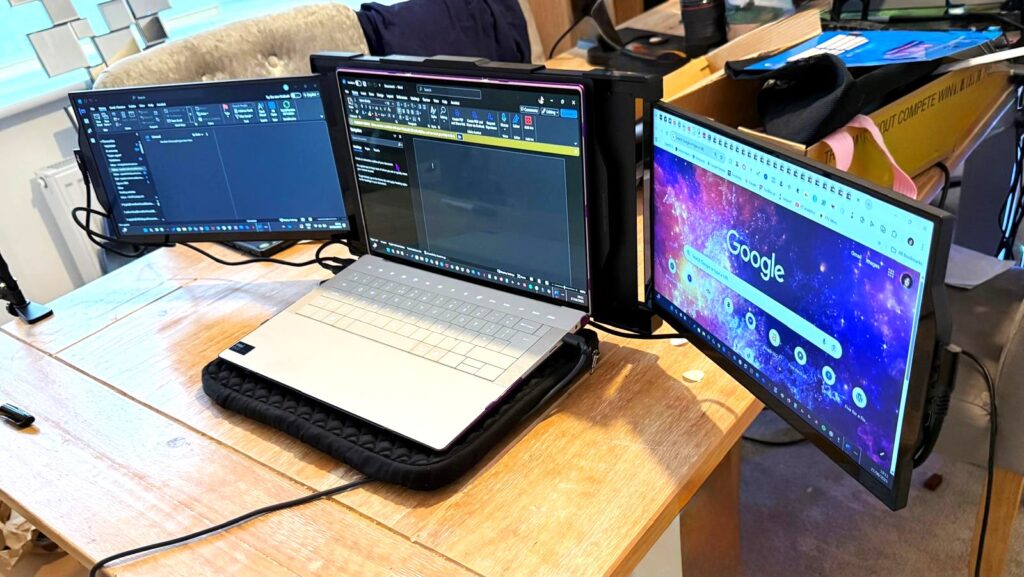
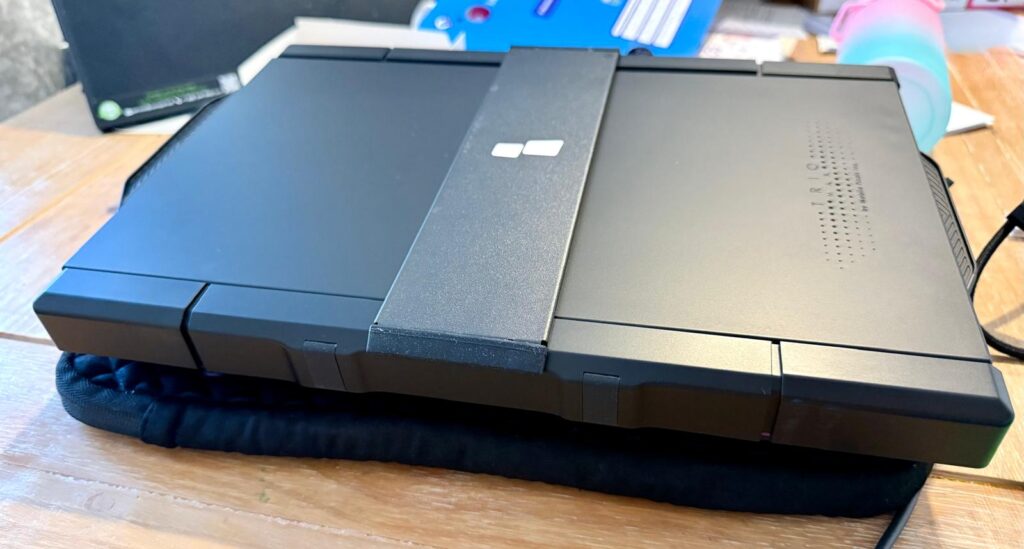
A product like the Mobile Pixels Trio laptop screen extender can save you from this chaos, but only if you choose the right one. Unfortunately, the market is flooded with poorly designed options that promise the world but deliver disappointment.
With a reliable extender, you get space for every task. So, you don’t need to keep shuffling the tabs. Imagine it this way:
- One screen can hold the numbers for your quarterly budget
- Another can display the client proposal you’re drafting
- A third can carry the references and research materials
And with everything in sight, the brain can stay in flow without interruption. Undoubtedly, this flow is priceless for busy parents. It is the difference between “working ten hours and feeling crushed” or “working ten hours and still having clarity at the end”.
What issues to look out for with popular screen extenders
Before we dive into what works, let me share some feedback about a popular (and expensive) dual-screen extender that many parent entrepreneurs have wasted money on. This particular model costs around £400, a significant investment for any parent running a business.
The port placement disaster
One of the most frustrating issues with this expensive model is the poor port placement design. When you connect the cables, you end up blocking the control buttons. This means you literally cannot use the device’s functions without unplugging and reconnecting cables in an awkward, unnatural position.
Imagine you’re in the middle of an important client presentation, and you need to adjust your screen setup. Instead of a quick button press, you’re fumbling with cables while your client waits. As one reviewer noted:
“The ports, if you connect the cable, the HDMI cable, and the Type C cable in a certain way that are more natural to connect, you will block the buttons so people won’t be actually be able to press the buttons without unplugging the HDMI.”
The cable chaos problem
Another major issue that particularly affects parent entrepreneurs who need to work from different locations, like the kitchen table, bedroom, or living room, during kids’ activities is that some extenders require two separate cables: an HDMI cable and a Type-C cable.
This creates multiple problems:
- Port shortage: You’re using up two valuable USB-C ports on your laptop, leaving no room for your charger or other essential devices
- Portability nightmare: Carrying around two cables increases the chance of forgetting one
- Setup complexity: Every time you set up, you need to connect two cables correctly
As the reviewer explained:
“They use up very important real estate space on your laptop because you’re now occupying two Type Cs. And if you’re connecting your charger with a normal work laptop, you run out of plugs.”
The weight and balance crisis
This is perhaps the most concerning issue for parent entrepreneurs, who often work on their laptops in various positions, i.e. on the bed while kids sleep nearby, at the kitchen counter while dinner cooks, or on the couch during family time.
The weight of this particular extender actually broke the laptop stands and put dangerous stress on the laptop hinges. As the reviewer discovered:
“It’s also very heavy that it’s actually broken the stands of my laptop… My dad said that it’s very bad on the hinges of the laptop as well.”
The magnetic attachment system makes the problem worse by lifting the entire laptop base, putting all the weight stress on the hinges rather than distributing it properly.
“The whole load from the base of your laptop is working on your hinges,” the reviewer explained.
The build quality disappointment
For £400, you’d expect premium build quality. Instead, this model uses cheap plastic that scratches easily and feels flimsy.
“The plastic is just going to break very easily. One of the screens has been scratched because of how they engineered the whole construction of it.”
The attachment mechanism is particularly problematic:
“It’s very flimsy to take in and out as well. That’s a big one. I really struggle to.”
More space brings calm and leads to better focus
Today, everyone talks about multitasking. However, the truth is that our brains can’t cope with it daily, especially when you’re already mentally juggling work tasks with family responsibilities. A reliable extender offers that space, as it allows the work to spread easily across the screen in an uninterrupted flow.
And, the point is not only about being faster. It is also about staying calm while working. With a clear space, your shoulders drop, your eyes stop darting back and forth, and the work feels steadier. You can also focus better, even when you are working late into the night after the kids are asleep.
What to look for in a reliable portable laptop monitor

Based on real user experiences and the needs of parent entrepreneurs, here’s what actually matters:
Single cable solution
Avoid any extender that requires multiple cables. Look for models that use a single USB-C cable for both power and video. This simplifies setup, reduces cable management, and preserves your laptop’s precious ports for other devices.
Lightweight design with proper support
The extender should be light enough not to stress your laptop hinges, but if it does add significant weight, it should include a proper stand or support system that doesn’t rely entirely on your laptop’s hinges.
Durable build quality
Skip the cheap plastic options. Look for aluminium construction or high-quality materials that can withstand daily use, travel, and the occasional accidental bump from curious little hands.
Intuitive button placement
Control buttons should be easily accessible regardless of how cables are connected. You shouldn’t need to contort your setup or unplug cables just to adjust brightness or settings.

Magnetic vs. clamp attachment
While magnetic attachment is convenient, it can create balance problems. Some of the most reliable options use adjustable clamps or stands that properly distribute weight.
Great for parents who can’t afford breaks
With a durable extender, you don’t lose momentum when your work time is fragmented. These extenders remain reliable even when used in short bursts throughout the day and far past the point when others would have given up for the day.
The hidden costs of choosing wrong
When you choose a poorly designed laptop screen extender, the real cost goes beyond the initial purchase price. Consider these hidden expenses:
Laptop repair costs
If the extender damages your laptop hinges or screen, you’re looking at expensive repairs. For many parent entrepreneurs, the laptop is the primary business tool – its failure means lost income.
Lost productivity time
Every minute spent wrestling with cables, adjusting awkward positioning, or dealing with technical issues is time stolen from either work or family. For a problematic device, you’re paying premium prices for premium frustration.
Replacement costs
When a poorly built extender breaks or becomes unusable, you’re back to shopping again. The reviewer of our expensive example concluded: “I’m very annoyed. And I would send it back.”
Creating your ideal work setup as a parent entrepreneur
The key to a successful portable monitor setup for parent entrepreneurs is thinking beyond just the screen itself. Consider your entire workflow:
Location flexibility
Your setup needs to work in multiple locations. The kitchen table for early morning work, the living room for evening catch-up, the bedroom for late-night client calls when kids are sleeping nearby.
Quick setup and teardown
When you need to clear the space for dinner or family time quickly, your setup should pack away easily without multiple cables and components.
Child-proofing considerations
Young children are naturally curious about screens and gadgets. Your setup should be stable enough that accidental bumps don’t cause expensive disasters.
Noise considerations
Some extenders have fans or make electrical sounds that can disturb sleeping children or interfere with client calls.
Laptop screen extender is a long-term companion
A reliable extender is an investment for parent entrepreneurs who plan for the long term. The best option lasts through many years of diverse use cases – from client presentations to late-night project work to mobile office setups during family vacations.
You will notice that their hinges don’t loosen, frames don’t crack, and they even carry the weight of daily work without complaint. This is the kind of endurance that matters in more than one way. Yes, it saves you money by avoiding the need for replacements. It also builds a relationship of trust. So, when a parent entrepreneur starts their work session – whether it’s a 6 AM pre-kid work block or an 11 PM catch-up session – they know their extender will perform as expected.
For parent entrepreneurs, this reliability is crucial. When you have limited time to work, equipment failures aren’t just inconvenient – they can derail entire projects and affect client relationships.
Alternative solutions worth considering
While screen extenders can be valuable, they’re not the only solution for parent entrepreneurs struggling with screen space:
External monitor setup
If you primarily work from a home office, a traditional external monitor might offer better value and reliability than a portable extender. Modern monitors are more affordable than ever, and they don’t put stress on your laptop.
Tablet as second screen
Apps like Duet Display or Sidecar (for Mac users) can turn your iPad into a second screen. This might be particularly useful for parent entrepreneurs who already have tablets for family use.
Ultra-wide laptop screens
When it’s time to upgrade your laptop, consider models with ultra-wide screens instead of adding an extender. This eliminates compatibility issues and cable management.
Virtual desktop solutions
Software solutions that help organise your workspace might address screen real estate issues without requiring additional hardware.
The parent entrepreneur’s decision framework
Before investing in any portable laptop monitor, ask yourself:
- Where will I primarily use this? If it’s mainly at a desk, a traditional monitor might be better.
- How often will I move it? More frequent movement means weight and setup complexity matter more.
- What’s my backup plan? If the extender fails, how will it affect your work and deadlines?
- Can my laptop handle it? Consider both the technical requirements and physical stress.
- What’s the total cost of ownership? Include potential laptop damage, replacement costs, and productivity losses.
Final thoughts
Ultimately, you can see that a reliable laptop screen extender can change the way long workdays feel for parent entrepreneurs. They add more space for you to protect your focus during those precious, uninterrupted work hours. With the right screens, you get the comfort and organisation you need. Besides, they become your best partners for productivity when time is your most precious resource.
However, the market is filled with expensive options that promise more than they deliver. The example we discussed shows that a higher price doesn’t always mean better design or reliability. As parent entrepreneurs, we can’t afford to make expensive mistakes with our essential work tools.
Before making any purchase, research thoroughly, read real user reviews, and consider whether the solution actually solves your specific challenges.
The key is finding a balance between functionality, reliability, and cost that makes sense for your unique situation as a parent building a business. Sometimes the best solution isn’t the most expensive one – it’s the one that consistently works when you need it most.
You can also make the switch right away, but make it thoughtfully. Your future self, both as an entrepreneur and as a parent, will thank you for choosing tools that enhance rather than complicate your already complex life.
*Collaborative feature post and gifted product*